Google Merchant Center Price Mismatches: How to Prevent Product Disapprovals in 2026
Google’s updated guidance exposes a costly weakness in ecommerce advertising: when product prices or stock levels change faster than your feed can keep up, automatic corrections may fail. Here’s how to protect product eligibility and prioritize the revenue at risk.

A product can have strong demand, a competitive price, and a profitable advertising history and still disappear from Google Shopping because its product data no longer matches its landing page.
Google's recently updated Merchant Center guidance makes an important limitation explicit: automatic product updates may not work when prices or availability change frequently. If Google detects a mismatch, it may disapprove the product rather than correct the information automatically.
For ecommerce advertisers, this changes how product feed maintenance should be prioritized. Feed accuracy is not simply a technical requirement. It is a condition for maintaining access to advertising inventory.
The commercial question is no longer just whether your product feed is working.
It is how much revenue becomes exposed when your product data stops being reliable.
What changed in Google Merchant Center?
Google has clarified that automatic item updates may fail for products with frequent price or availability changes, giving changes more than once per day as an example.
The updated documentation also explains that Google may stop automatic updates when the number of detected mismatches becomes too large.
The clarification was highlighted by Search Engine Roundtable on October 8, 2026. Google's official documentation confirms the behavior, although it does not establish a universal numerical threshold at which products will automatically be disapproved. Search Engine Roundtable
This distinction matters.
Changing a product's price twice in one day does not automatically mean that Google will disapprove it. The problem arises when Google cannot reliably reconcile the product information it receives with what it finds on the website.
For retailers using dynamic pricing, flash promotions, inventory-based discounts, or frequently changing stock levels, the risk is particularly relevant.
Google's official automatic item updates documentation explains that these automations are intended to correct occasional inconsistencies, not replace regularly updated product data.
That creates an important operational requirement: the systems responsible for pricing, inventory, product pages, and advertising feeds need to stay aligned.
Why price mismatches happen even when your feed is technically working
A Google Merchant Center price mismatch occurs when the submitted product price does not agree with the price Google finds on the product's landing page or other relevant product information.
The same principle applies to availability.
A retailer may update its website immediately while the product feed continues displaying an older value.
Consider a hypothetical example.
An ecommerce business reduces a product's price from $59 to $49 at 10:00 a.m.
The website reflects the new price immediately. However, the product feed is scheduled to refresh overnight.
For several hours, the two systems disagree.
Alternatively, the feed may update first while a cached product page continues displaying the previous price.
In both cases, the business has introduced a period of inconsistent product information.
Google's product data requirements specify that submitted prices must match the relevant landing page and checkout prices. The requirements also cover currency, variants, and how prices are presented to customers. Google Help
The four places where product data can disagree
For practical troubleshooting, ecommerce teams should compare four representations of the same product:
- The price and availability stored in the ecommerce platform or product information system.
- The values submitted through the Merchant Center product data source.
- The price and availability visible on the product landing page.
- The structured product data that Google can extract from the page.
These values should describe the same product variant and the same offer.
A correct feed does not compensate for incorrect structured data. Similarly, a correct landing page does not guarantee that Merchant Center has received the latest product information.
The objective is consistency across the entire product data flow—not simply a successful feed upload.
Figure 1 — Where Merchant Center mismatches start
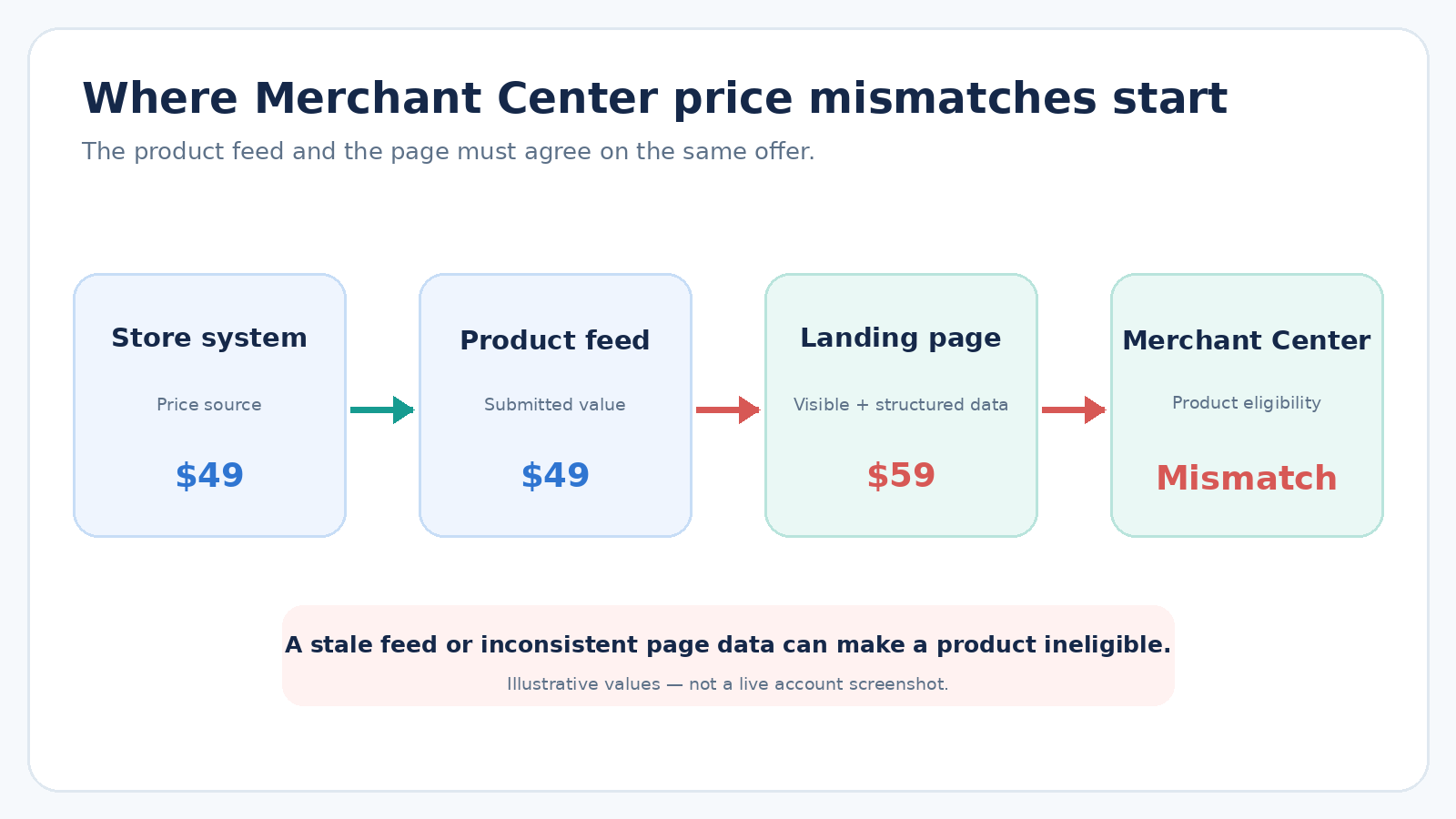
Illustrative example: a submitted price of $49 conflicts with a landing page price of $59.
Why automatic item updates are not enough
Merchant Center's automatic item updates can use structured data and other information extracted from product pages to correct certain product attributes.
Supported attributes include price, sale price, availability, and condition.
For example, when a submitted product price differs from the price found on the landing page, Google may update the product information to reflect the website.
This is useful when occasional differences occur between feed submissions.
However, Google's documentation makes two limitations clear.
First, automatic updates are intended to resolve sporadic problems affecting a relatively small portion of the product catalog.
Second, products with frequently changing prices or availability may be disapproved instead of corrected.
Google also states that automatic updates can stop when too many mismatches are detected. Google Help
The implication is straightforward: automatic item updates should be treated as a fallback mechanism, not the primary product synchronization strategy.
When automatic updates are most useful
For a relatively stable catalog with occasional pricing changes, automatic updates can help resolve temporary inconsistencies.
For a retailer running frequent promotions or dynamic pricing, the product data integration needs to handle changes proactively.
Disabling automatic updates is not necessarily the solution. It can remove a useful safeguard without addressing the underlying synchronization problem.
The better question is whether the ecommerce platform, product feed, and landing page are updating consistently.
How to prevent Google Merchant Center price mismatches
Preventing product disapprovals requires more than increasing the frequency of scheduled feed uploads.
A reliable process should address how changes originate, how they are distributed, and how the final information is validated.
1. Establish a single source of truth
Pricing and inventory should originate from a clearly defined system.
For some businesses, this will be the ecommerce platform. For others, it may be an ERP, inventory management system, or product information management platform.
The important requirement is that the website and product feed use consistent underlying information.
If different systems independently calculate or modify prices, discrepancies become more likely.
This is especially important when businesses use multiple pricing rules, currencies, or promotional integrations.
2. Synchronize changes across the website and product feed
The frequency of product updates should reflect how frequently product information changes.
A catalog with stable pricing has different requirements from one that changes prices throughout the day.
Google recommends using Merchant API when products require frequent price or availability updates.
However, the API also has usage limits.
Google's Merchant API documentation explains that product-related daily call quotas are generally calculated around twice the account's offer quota. Individual products can be updated more than twice, provided the account stays within its aggregate daily call allowance. Google for Developers
This is an important distinction for high-frequency retailers.
Moving from scheduled feeds to API-based updates does not automatically eliminate synchronization problems. Teams still need to manage request limits, failed submissions, retries, and processing delays.
The practical objective is to ensure that product changes reach the relevant systems quickly and reliably, within the integration's supported limits.
3. Validate the product landing page
Google evaluates information found on the product landing page, including structured data.
Retailers should verify that the page presents the correct price, currency, availability, and product variant.
Special attention should be paid to:
- Products with multiple variants or prices.
- Promotions that start or end automatically.
- Pages using currency conversion or location-dependent pricing.
- Product information affected by caching.
- Structured data that does not match the visible offer.
Google's product pricing requirements and product structured data guidance provide the relevant technical requirements.
A successful structured data validation is useful, but it does not replace checking whether the submitted feed and the actual customer-facing offer agree.
4. Treat promotions as synchronization events
Flash sales create predictable moments of risk.
When a promotion begins or ends, the website and submitted product information need to reflect the correct active price.
Google supports the sale_price attribute and the sale_price_effective_date attribute for representing promotional pricing.
The effective-date attribute allows merchants to specify the period during which a sale price applies.
Correctly configured promotional data can reduce ambiguity, but the website and submitted information must still remain consistent. Google Help
For high-volume retailers, promotion launches should therefore include a product data validation step—not just a creative and campaign launch checklist.
5. Monitor product eligibility, not only feed processing
A successfully processed feed does not guarantee that every product remains eligible to appear in advertising.
Merchant Center provides product-level status information and a Needs attention area for identifying problems.
Advertisers should monitor changes in product eligibility alongside their advertising performance. Google Help
This is particularly important for Shopping campaigns and feed-based Performance Max inventory.
Performance Max can also serve other ad formats, so a product-level disapproval should not automatically be interpreted as the complete suspension of a Performance Max campaign. Google Help
The commercial risk is the loss of eligible product inventory, not necessarily the disappearance of the entire campaign.
The commercial cost of product disapprovals
Most product feed troubleshooting begins with a technical metric: the number of affected products.
But the number of disapproved products does not tell you how much business is at risk.
A retailer with 10,000 products could have 200 disapprovals affecting rarely purchased inventory.
Another retailer could have only 20 disapproved products, but those products might represent a substantial share of its Shopping revenue.
Treating these situations as equally urgent would be a poor allocation of resources.
ConversionNest's perspective: product feed issues should be prioritized by commercial exposure, not merely by error count.
A practical revenue-at-risk model
A useful first step is to estimate the historical revenue associated with affected products during the period in which they were ineligible.
A simple planning model is:
Revenue exposure = Historical daily Shopping revenue from affected products × Days of ineligibility
Suppose a group of products generated $90,000 in attributed Shopping revenue during the previous 30 days.
Their average daily revenue was approximately $3,000.
If those products become ineligible for one day, the historical revenue exposure is approximately $3,000.
This is a hypothetical calculation, not a reported client result.
Importantly, $3,000 of revenue exposure is not the same as $3,000 of proven lost revenue.
Some customers may purchase through organic search, direct traffic, another product, or another channel. Demand may also differ from the historical average.
The model is useful for prioritizing operational attention, not for claiming causal revenue loss.
A more rigorous estimate would account for seasonality, substitution, incremental contribution, and the duration of actual lost advertising eligibility.
Figure 2 — Revenue exposure model
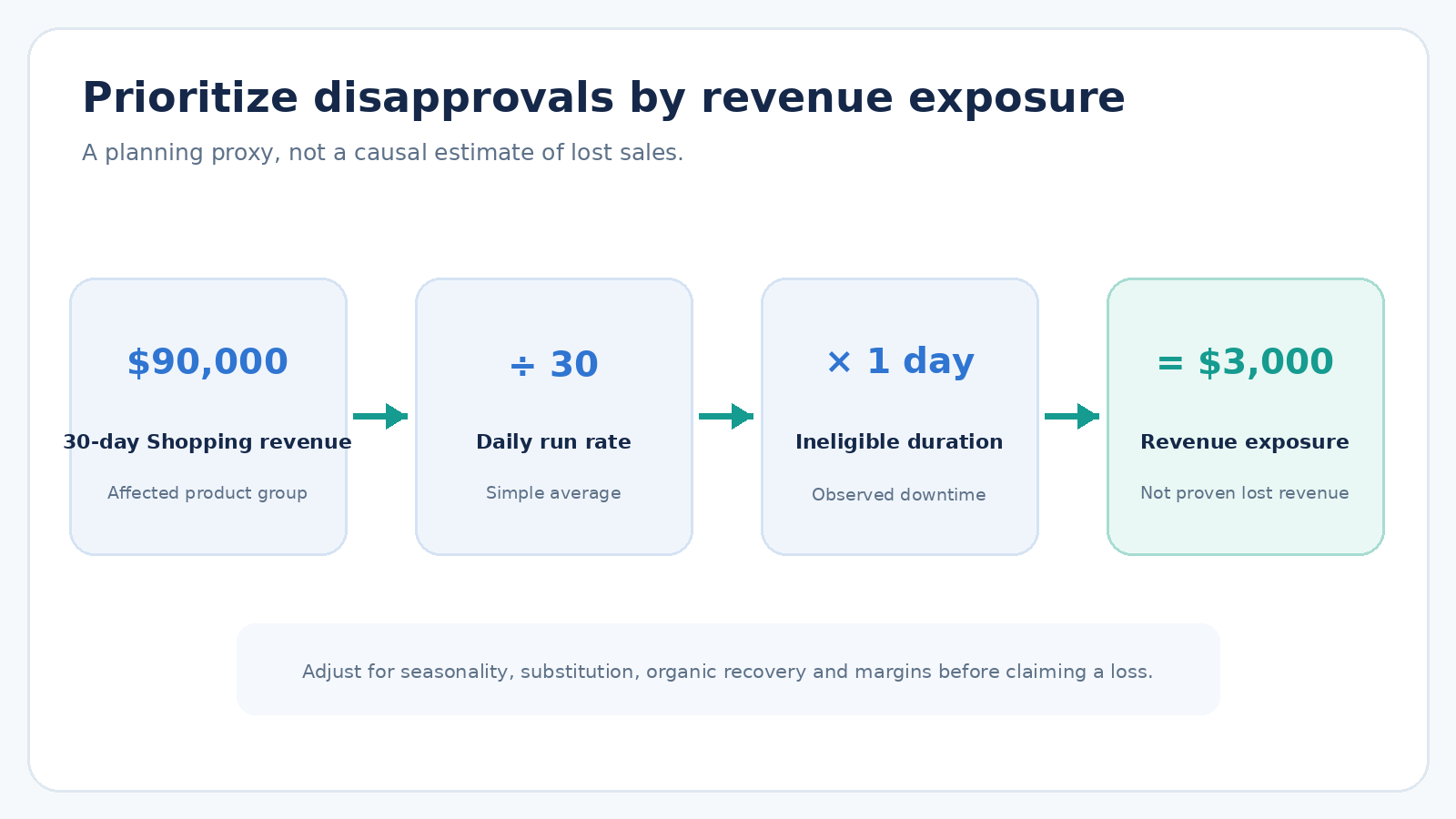
Illustrative calculation showing how historical product revenue can inform disapproval prioritization.
Prioritize by impact, not volume
Once affected products have been identified, ecommerce teams can rank issues using three considerations:
Commercial importance: How much revenue or contribution margin is associated with the affected products?
Severity: Are the products completely ineligible, eligible only on certain surfaces, or receiving warnings while continuing to serve?
Persistence: Is the mismatch a short-lived synchronization delay or a recurring integration failure?
This creates a more useful operational queue than simply working through Merchant Center errors in alphabetical order.
A high-margin bestseller that has stopped serving should generally receive attention before a low-demand product with a minor warning.
A decision framework for ecommerce growth teams
Product feed reliability should be treated as a shared responsibility between marketing, ecommerce operations, and engineering.
A practical framework begins with five questions.
- Identify: Which products have become ineligible, and why?
- Quantify: What is their historical revenue and margin contribution?
- Diagnose: Where did the product information become inconsistent?
- Correct: What change will prevent the mismatch from recurring?
- Monitor: How will the team detect the next failure earlier?
The objective is to move from reactive troubleshooting toward a repeatable operating process.
For larger catalogs, this can justify automated monitoring that compares submitted product information against live website values and flags inconsistencies before they become widespread.
For smaller businesses, a simpler process may be sufficient: review Merchant Center product issues regularly, verify synchronization after major promotions, and investigate unexpected changes in eligible product counts.
The appropriate level of automation depends on catalog size, pricing frequency, technical complexity, and commercial exposure.
What advertisers should not do
Several common responses can make product data problems worse.
Repeatedly changing product identifiers is not a substitute for correcting inaccurate information. Product IDs should consistently identify the same products.
Disabling automatic updates without understanding the underlying mismatch may also remove a useful safeguard.
Likewise, increasing advertising budgets will not restore product eligibility when the underlying issue is inaccurate product data.
And a feed that processes successfully should not be treated as proof that the customer-facing product information is correct.
The priority should be to identify the original source of the inconsistency and correct the process responsible for creating it.
What this means for Shopping and Performance Max budgets
For growth leaders, the most important implication is that product data reliability can affect the amount of inventory available for advertising.
When products become ineligible, campaign performance may change for reasons unrelated to bidding strategy, audience demand, or creative quality.
That means an unexpected decline in Shopping performance should trigger two investigations:
First, examine the campaign's advertising metrics.
Second, verify whether the same products were eligible to serve throughout the period being compared.
Without the second check, advertisers risk misdiagnosing a product data failure as a media buying problem.
This distinction becomes particularly important during promotional periods, when pricing changes and advertising budgets may increase simultaneously.
A business can invest more heavily in advertising while unintentionally reducing the number of products eligible to appear.
Conclusion: Feed reliability is part of growth infrastructure
Google's updated guidance reinforces an important principle: automatic corrections cannot replace reliable product data management.
For ecommerce businesses, the solution is not simply to refresh feeds more frequently. It is to ensure that pricing, availability, structured data, and product submissions remain consistent as the business changes.
The commercial opportunity lies in connecting that technical reliability to better decision-making.
Measure product eligibility. Understand the revenue exposure associated with disapprovals. Prioritize the products that matter most. Then fix the underlying synchronization process.
A product cannot generate revenue through an advertising placement for which it is no longer eligible.
For ecommerce growth teams, protecting that eligibility deserves the same attention as optimizing bids, creative, and conversion rates.
Frequently Asked Questions
Can Google Merchant Center disapprove products that change prices more than once per day?
Yes, Google warns that automatic updates may not work for products with frequent price or availability changes, using more than once per day as an example. However, changing a price twice does not automatically trigger disapproval. The risk arises when Google detects inconsistent product information that it cannot reliably correct.
Do automatic item updates prevent price mismatch disapprovals?
Not always. Automatic item updates can correct some temporary differences between submitted product data and website information, but Google explicitly states that they are not a replacement for regular product data updates.
Should ecommerce businesses use Merchant API instead of scheduled feeds?
Businesses with frequently changing prices or inventory should evaluate Merchant API because it supports programmatic product updates. However, implementation must account for API quotas, processing delays, and integration reliability. A well-maintained scheduled feed may remain appropriate for a stable catalog.
Can a product feed issue affect Performance Max?
Yes. Product-level disapprovals can affect the Shopping inventory available to feed-based Performance Max campaigns. However, Performance Max can also serve other ad formats, so a product disapproval does not necessarily stop the entire campaign.
How should retailers prioritize Merchant Center disapprovals?
Prioritize issues according to product eligibility, historical commercial importance, and the duration of the problem. Revenue exposure can help rank affected products, but it should not be presented as a proven estimate of lost incremental revenue.
Is your landing page wasting the clicks you paid for?
Negatives fix who arrives. Nestor reviews what happens next: enter your URL, create a free account, and read what to fix first.
Free account required. No card, no sales call.
Sima Damar Beygu
Founder of ConversionNest. 10+ years in growth marketing, managing 300K euro monthly media budgets and scaling acquisition across 15+ markets. Google and Meta certified.
Sima on LinkedIn
Performance Max Creative A/B Testing: How to Design Experiments That Actually Inform Decisions
Learn how Performance Max creative A/B testing works, how to structure control and treatment assets, which metrics matter, and why creative experiments are not the same as incrementality studies.

Google Playground for Marketing: Can AI-Generated Games Become Interactive Ads?
Could Google Playground help brands create interactive advertising experiences? Explore practical marketing use cases, platform restrictions, measurement strategies, and commercial risks.
Google Ads Conversion Lift: Is Your ROAS Actually Incremental?
A campaign can report excellent ROAS while adding little incremental profit. Google's expanded Conversion Lift access creates an opportunity to test that assumption and make smarter budget decisions.