AI Max Text Customization Previews: A Pre-Launch QA Framework
Google Ads now lets advertisers inspect sample AI-generated headlines and descriptions before enabling text customization. The opportunity is to catch messaging risks earlier—but previews are not proof that future ads will be accurate, compliant or commercially effective.


Google Ads now lets advertisers preview sample AI-generated Search ad headlines and descriptions before enabling AI Max text customization. The useful change is not that Google can write more copy. It is that marketers can inspect potential messaging problems before handing the system more creative control.
The preview is not a compliance approval, a promise about what will serve, or a performance test. It is a pre-launch diagnostic. Conversion Nest's view: use it to audit the source page, identify unacceptable claims, set precise guardrails, and define what the team will inspect after launch.
What changed in AI Max text customization?
On October 8, 2026, Search Engine Land reported Google's new asset-preview workflow. Google's own documentation confirms that advertisers can enter a final landing-page URL and see a representative sample of up to 10 AI-generated headline and description assets, usually in under 30 seconds.
The samples can be viewed during Search campaign creation in Asset optimization or while editing an existing campaign. Advertisers do not need to enable text customization to generate the examples.
The feature is documented for the languages supported by text customization and most standard business categories, excluding adult content. Availability in a particular account should still be checked in the interface rather than inferred from an industry announcement.
Text customization itself is different from the preview. It is an AI Max setting that creates additional headlines and descriptions for responsive search ads using signals that include the landing page, domain, existing ads and ad-group keywords.
Google says it combines extraction from page content and metadata with generative AI. Enabling the live feature requires opting in to AI Max; viewing examples does not.
For the current interface and eligibility details, consult Google's text customization documentation.
What the preview can and cannot tell you
The preview answers a narrow question: what kinds of assets might Google's system generate from the inputs and guidelines available at that moment?
It can reveal a stale promotion, an imprecise product description, an unwanted tone or a claim that needs verification. It can also expose problems in the source material that a marketer might otherwise overlook.
It cannot establish that the same assets will serve after activation.
Google describes the output as a representative sample, not a complete inventory. Live combinations depend on query context and other eligible assets.
Google also says customized assets are reviewed at least every 48 hours and refreshed when needed, so the pool may change as page content and user behaviour change.
That distinction changes the approval process.
A clean preview is evidence that the sampled outputs passed a particular review. It is not evidence that every future output will be acceptable.
The Conversion Nest pre-launch QA framework
A useful review process separates errors that should block activation from issues that can be corrected and monitored.
The following framework is Conversion Nest analysis, not an official Google scoring system.
1. Verify the landing page before judging the AI
Start with the final URL and the source material the system may read.
Check visible offers, product specifications, page titles, descriptions and metadata. Confirm that promotions are current and that important qualifications are visible.
This matters because Google's documentation explicitly identifies landing-page content and metadata as inputs to generated text.
If the source page contains an expired discount or ambiguous promise, changing a few sample headlines may leave the underlying problem unresolved.
2. Preview the highest-risk URLs
Generate samples for the landing pages most likely to produce costly mistakes: promotional pages, location-specific offers, regulated products, complex pricing and pages that change frequently.
Review each sampled headline and description against the actual offer and intended audience.
Do not assume a clean sample from one URL proves that another landing page is safe. The review should follow the pages and claims that matter commercially.
3. Classify each finding by decision
Use three decision categories:
- Block: An unsupported claim, inaccurate price, misleading availability statement or material legal/compliance risk. Do not enable text customization for the affected scope until the issue is resolved and, where relevant, reviewed by the responsible compliance team.
- Fix: A correctable mismatch in positioning, terminology, tone or landing-page copy. Update the source or the applicable guidelines, then preview again.
- Monitor: A stylistic preference or low-impact variation that remains accurate and acceptable. Document it for post-launch review rather than treating every difference as a launch blocker.
This prevents teams from spending equal effort on cosmetic phrasing and commercially consequential errors.
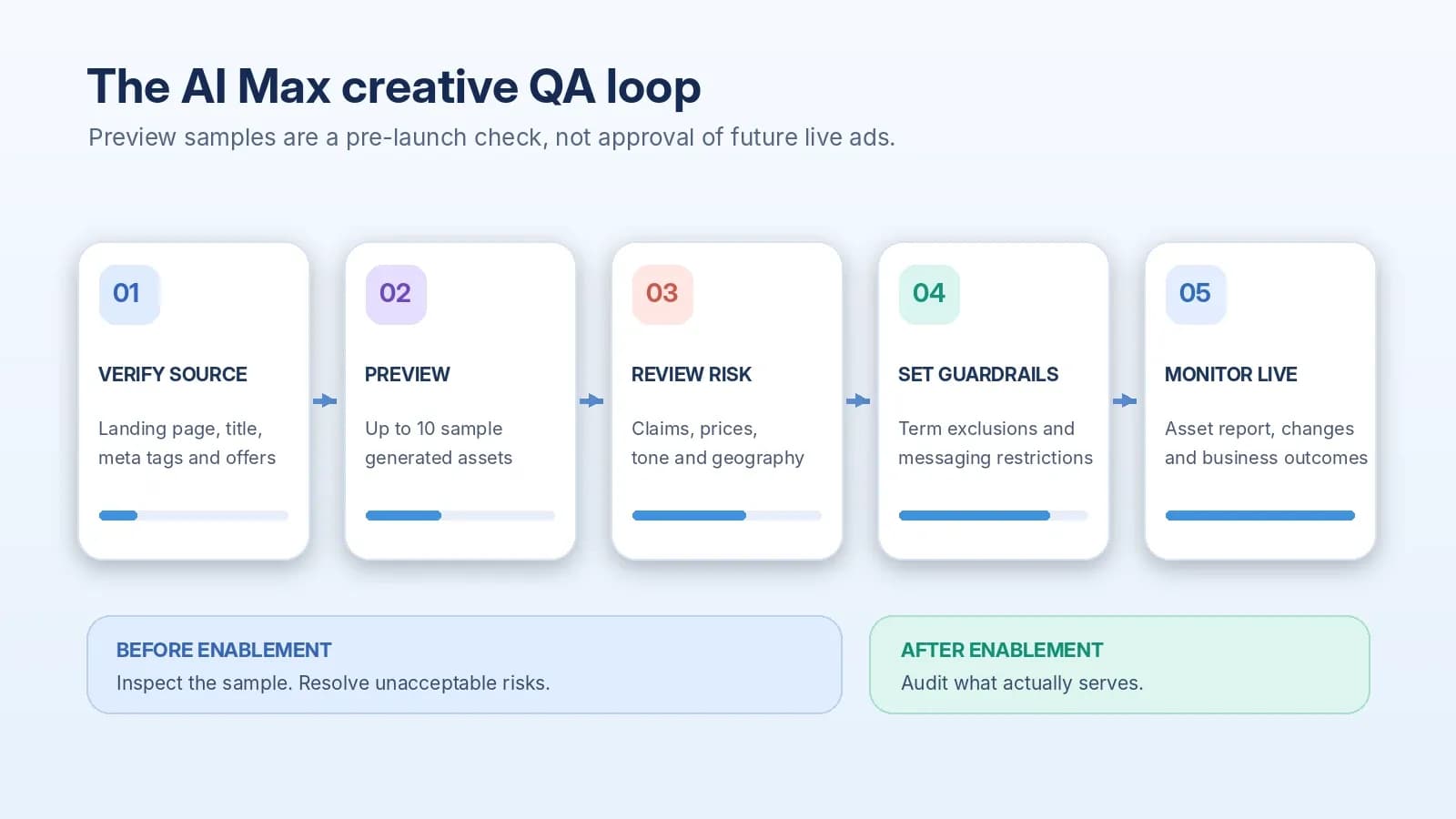
Conversion Nest pre-launch QA workflow for reviewing AI Max-generated ad copy.
4. Use text guidelines for repeatable restrictions
Google's text guidelines feature, currently labelled beta, offers term exclusions and messaging restrictions for Google-optimized text assets.
Google's documentation lists up to 25 term exclusions and 40 messaging restrictions per campaign.
The difference is important.
A term exclusion is useful for an exact word or phrase. A messaging restriction is better for a concept, such as avoiding prices or discount claims.
Google specifically warns that excluding a currency symbol does not prevent generated price claims; a clear messaging restriction is the appropriate control.
Term exclusions are language-specific, while messaging restrictions can apply across languages.
Google also warns that overly restrictive guidelines may remove useful assets. In the preview, rules that filter out every candidate can produce a prompt to adjust them.
These controls are safeguards, not a substitute for checking the resulting assets.
See Google's text guidelines documentation.
5. Define the live-review owner before enabling
Assign someone to review generated assets after launch, record issues and decide when a campaign should be paused or text customization disabled.
A preview without a live monitoring process is only a one-time inspection of a changing system.
Google documents the “Google AI” designation in the “Added by” column of asset reporting.
Ad-level, campaign-level and combination reports can help teams find generated assets and inspect which combinations are appearing.
The official reporting guide describes these views.
A worked example: a promotion that looks better than it is
Consider a hypothetical subscription brand whose landing page displays “Plans from €19” while a prominent banner promotes a short-lived discount.
Its page description still mentions a previous offer.
A sample AI-generated headline that refers to the old discount would be a clear reason to stop and investigate.
The wrong response would be to mark that single headline as bad and move on.
The stronger response is to fix the outdated page description, verify the visible pricing terms, add a restriction against unapproved discount claims if appropriate, and generate another preview.
After launch, the team would inspect actual Google-generated assets and watch for changes following the next promotion update.
The example is hypothetical; it is not a reported Google Ads result or a Conversion Nest client case.
How to measure success without confusing asset metrics with causality
The first success criterion is operational: were inaccurate or unacceptable messages prevented or corrected?
Keep a review log with the URL, claim, issue severity, owner, action and resolution date.
These are proposed governance metrics, not metrics supplied by Google.
The second criterion is commercial: did enabling text customization improve the campaign outcome that matters?
Compare qualified conversions, conversion value, acquisition cost or contribution economics using a suitable campaign experiment when feasible.
A simple before-and-after change cannot reliably isolate the effect of AI-generated copy from demand, bidding or auction changes.
Do not rank individual generated headlines by ROAS as though each were an independent treatment.
Google's responsive search ad asset-report guidance says asset-level ratios are directional because multiple assets appear together, and asset-level counts may not add up to campaign totals.
Evaluate the campaign or experiment as a whole before making budget decisions.
This is also why a successful copy review should not be confused with proof of incremental growth.
For the broader distinction between attributed performance and causal impact, see Conversion Nest's Google Ads Conversion Lift guide.
Who should enable AI Max text customization after reviewing previews?
For an advertiser with accurate, stable landing pages, a clear brand voice and capacity to monitor live assets, the preview creates a practical opportunity to test text customization with lower messaging uncertainty.
The decision should still depend on an experiment and the business objective, not the apparent quality of ten examples.
For brands with changing prices, regional restrictions or tightly controlled claims, the burden is higher.
Source-page accuracy, specific guidelines and accountable review are prerequisites.
Where an unacceptable claim cannot be reliably controlled, keeping text customization disabled for the affected campaign may be the better decision.
The commercial trade-off is between the potential value of broader automated creative coverage and the cost of errors, monitoring and lost control.
That trade-off differs by product, market and regulatory context.
Google does not guarantee that a preview removes these risks.
Conclusion
AI Max text customization previews make one part of automated Search advertising easier to inspect before activation.
Their value is diagnostic, not predictive.
The best workflow is to verify the source, preview representative pages, correct material risks, apply precise guidelines and monitor the assets that actually serve.
Treat performance improvement as a separate question requiring suitable measurement.
The strategic advantage is not approving more AI copy faster. It is making creative automation accountable to accurate claims and commercial outcomes.
Frequently asked questions
Can I preview AI Max-generated headlines without enabling text customization?
Yes. Google's documentation says advertisers can generate up to 10 representative headline and description assets from a final URL without opting in to text customization.
Are the previewed assets the exact ads Google will serve?
No. They are representative examples. The live asset pool and responsive search ad combinations can change, so advertisers should review generated assets after activation.
Where do I find AI Max text customization previews?
Google documents previews in the Asset optimization section during Search campaign creation and when editing existing campaigns. The preview uses a final landing-page URL.
Can text guidelines prevent every unwanted price claim?
No control should be treated as a guarantee. Google says a currency-symbol term exclusion will not block price-related assets and recommends a messaging restriction for concepts such as avoiding prices. Review live output as well.
How can I identify Google-generated text after launch?
Google's asset reporting uses “Google AI” in the “Added by” column. Review ad-level, campaign-level and combination reports, and interpret asset-level performance ratios as directional rather than causal.

Sima Damar Beygu
Founder of ConversionNest. 10+ years in growth marketing, managing 300K euro monthly media budgets and scaling acquisition across 15+ markets. Google and Meta certified.
Sima on LinkedIn
Performance Max Creative A/B Testing: How to Design Experiments That Actually Inform Decisions
Learn how Performance Max creative A/B testing works, how to structure control and treatment assets, which metrics matter, and why creative experiments are not the same as incrementality studies.
Google Merchant Center Price Mismatches: How to Prevent Product Disapprovals in 2026
Frequent price and stock changes can trigger Merchant Center disapprovals. Learn how to diagnose feed mismatches, manage automatic updates, and protect Shopping revenue.
Google Ads Conversion Lift: Is Your ROAS Actually Incremental?
A campaign can report excellent ROAS while adding little incremental profit. Google's expanded Conversion Lift access creates an opportunity to test that assumption and make smarter budget decisions.